Product Comparison
Byoxon vs. Zoho Projects: One PSA Subscription vs. a Three-App Zoho Stack
This article compares Byoxon (BoB) and Zoho Projects for service teams that want project margin visible without stitching three Zoho apps together. It covers Zoho Projects’ current 2026 pricing, where timesheets and budgets sit in its plan ladder, and what invoicing and CRM add once you license the other Zoho apps that Projects itself does not include. It also prices a ten-person team both ways.

Zoho Projects is one of the most affordable project management tools on the market, and it is a genuinely capable one. It gives you task management, Gantt charts, time logs, budgets and a free plan for up to five users. It belongs to the wider Zoho One ecosystem. That membership is both its main selling point and its main complication.
Zoho Projects itself does not invoice clients and does not run a sales pipeline. Those functions live in separate Zoho products, Zoho Books and Zoho CRM. Each carries its own plans and its own bill. Zoho’s own help documentation describes the three as integrated, not unified. Data flows between them, but you still run three applications.
Byoxon makes a different scope decision. BeOnBoard (BoB) puts the CRM, time tracking, invoicing, HR and project profit and loss in a single subscription at a published per-user price. This comparison sets out what a services team pays and assembles, either way, to reach the same margin number.
Byoxon vs Zoho Projects at a glance
| Capability | BoB (Byoxon) | Zoho Projects |
|---|---|---|
| Entry price | $24.95/user/month (1–10 users) | Free (up to 5 users) |
| Paid tiers | $21.95 (11–49), $18.95 (50–199), $15.95 (200+) | Premium $4/user, Enterprise $9/user, Ultimate $14/user (annual billing) |
| Monthly billing | Same published rate | About $5, $10 and $15/user respectively |
| Free plan | Up to 5 users, no feature limitations | Up to 5 users, 3 projects, 5GB storage |
| Storage | Included | 100GB (Premium), 120GB (Enterprise), from 150GB (Ultimate) |
| Timesheets | Included on every tier | Premium and above only |
| Budget and EVM tracking | Included on every tier | Premium and above only |
| Project P&L | Standard real-time report on every tier | Not a native report; assemble from time logs, budget data and Zoho Books |
| Invoicing | Included, client and contractor billing | Not in Zoho Projects; requires Zoho Books (separate subscription) |
| CRM / deal pipeline | Built-in, with deal tracking | Not in Zoho Projects; requires Zoho CRM (separate subscription) |
| HR, PTO, recruitment | Included | Not included; requires Zoho People (separate subscription) |
| Gantt and task management | Included | Included on every tier, including Free |
| Best fit | Services teams that want the whole record in one login | Teams that want low-cost task management and accept running several Zoho apps together |
Figures come from each vendor’s own pricing page in September 2026. Zoho lists its annual-billing rate as the headline price; monthly billing runs roughly 20–25% higher. Confirm current terms before you buy.
Where Zoho Projects is the better choice
Take this section seriously. For many teams, Zoho Projects is the more sensible buy.
- Zoho Projects costs far less per seat. Premium runs $4 per user per month on annual billing. Ten people cost $40 a month before any add-on. The same ten on Byoxon’s entry tier cost $249.50.
- The free plan is genuinely usable. It gives five users, three projects, Gantt charts and task management, forever, with no card required. Byoxon’s free plan also covers five users. But Zoho’s free tier is a real option for a team that only needs task tracking.
- You already run Zoho One. If your business already pays for Zoho CRM, Zoho Books and Zoho People, adding Zoho Projects keeps everything inside one vendor relationship, even though each app stays a separate product.
- Zoho Projects is not services-specific. It handles general task and portfolio management well, for teams that are not structured around billable hours and client margins at all.
- It scales down as well as up. Zoho charges per active user with no minimum seat count. A three-person studio pays for three seats.
If your team’s core need is inexpensive task tracking, and margin reporting is a nice-to-have rather than the point of the purchase, Zoho Projects is a strong and honest choice.
One subscription vs. a three-app Zoho stack
Here is the angle in one sentence. Both routes produce a project margin number. One route produces it inside a single login. The other produces it by moving data between three separate Zoho products, each licensed on its own plan.

What the Zoho stack requires
Zoho Projects on its own gives you tasks, a Gantt chart, and, on Premium and above, timesheets and a Budget and EVM view. It does not invoice clients. Zoho’s own documentation describes the Books integration this way: invoices created in Zoho Projects are reflected in your Zoho Books account, so you can track expenses and keep project and accounting data aligned. That is a real integration. It still means client billing runs through Zoho Books, a separate product with its own plans.
The sales side works the same way. Zoho Projects has no deal pipeline. If you want the CRM connected to delivery, that is Zoho CRM, integrated with Zoho Books so quotes and invoices stay visible from inside the CRM. Zoho’s own documentation notes a limitation here too. There is no direct sync between Zoho CRM’s native transaction modules and the matching modules in Zoho Books without a custom function. For HR and PTO, the equivalent is Zoho People, again a separate product.
None of this is a defect in Zoho’s design. Zoho One is built as a suite of specialist apps that share a login and integrate well. But “integrate well” still means three products, three admin panels, and three places where a field drifts out of sync.
What one Byoxon subscription covers
BeOnBoard ships the CRM, time tracking, invoicing, HR and project P&L as one schema, not as integrated products. A deal in the CRM becomes a project. Time logged against it carries the person’s cost rate and bill rate. The invoice, the labour cost and the margin resolve from the same record, with no sync step between apps. The project cost management page shows that report from the delivery side, and the employee timesheet page shows the hours that feed it.
See the margin in one login, not across three apps
Start free with up to 5 users — no feature limits. Load one live project into BeOnBoard and read its margin without opening a second product. Prefer a walkthrough first? Request a demo and we will show you the P&L view on your kind of project.
Pricing compared
Zoho Projects publishes four tiers. Free covers up to 5 users, 3 projects and 5GB storage, with no timesheets and no budgets. Premium is $4 per user per month on annual billing, or about $5 monthly, and adds timesheets, Budget and EVM tracking, unlimited projects and 100GB storage. Enterprise is $9 per user per month annually, around $10 monthly, and adds user hierarchy, teams and 120GB storage. Ultimate is $14 per user per month annually, around $15 monthly, and raises automation and reporting limits.
None of those prices include Zoho Books or Zoho CRM. Both are sold separately, each with its own plan ladder. A like-for-like total against Byoxon is therefore a Zoho Projects price plus two more subscriptions, sized to what your team needs from each.
A ten-person team, priced both ways
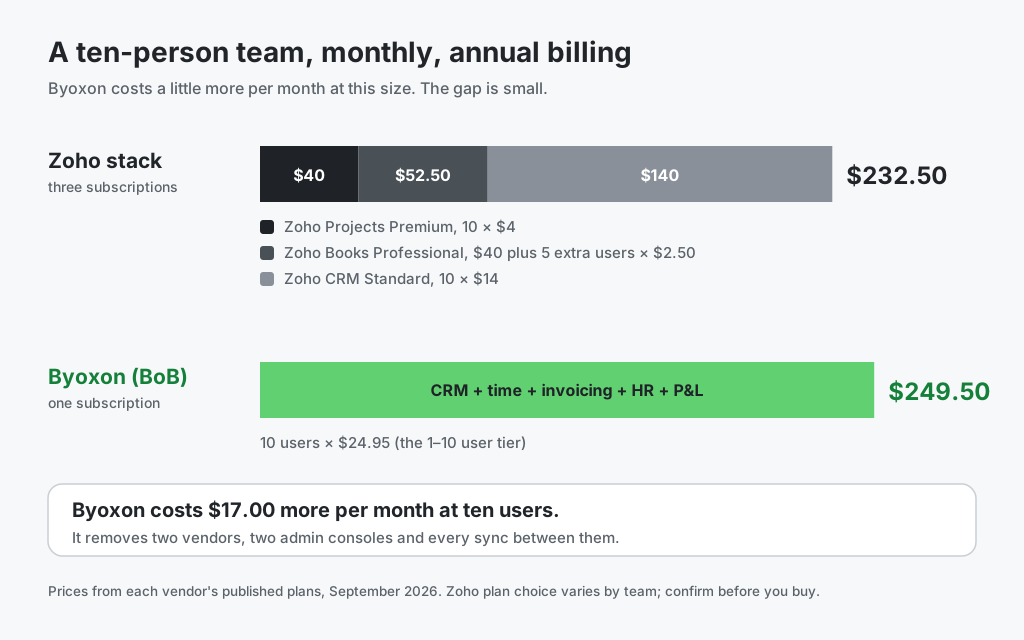
Take ten people on annual billing. Zoho Projects Premium costs 10 × $4, so $40 a month. Zoho Books Professional lists at $40 a month and includes five users, so five more at $2.50 each brings it to $52.50. Zoho CRM Standard lists at $14 per user per month, so $140. That totals $232.50 a month, and it still excludes Zoho People for HR.
Byoxon publishes one number that covers everything: $24.95 per user per month for one to ten users, $21.95 for eleven to forty-nine, $18.95 for fifty to one hundred and ninety-nine, and $15.95 for two hundred and above. A free plan covers up to five users. Ten people sit in the first tier, so ten seats cost $249.50 a month, with CRM, invoicing, HR and time all included.
State that plainly: at ten users Byoxon costs $17.00 more per month. The argument for it is not price. It is that the $249.50 buys one data model, one admin console and one bill, with HR included rather than added as a fourth product. If your cost per seat is the deciding factor, Zoho wins this line. Run your own headcount through the free time tracking calculator to see what your billable hours are worth against either figure.
Which one fits your team
Choose Zoho Projects if cost per seat decides the purchase, if your work needs no native CRM or invoicing, or if you already run Zoho One and accept managing three connected apps.
Choose Byoxon if you want the deal pipeline, timesheet, invoice, HR record and project margin in one login, and you would rather pay one published price than assemble three.
For a similar build-your-own-stack comparison, read Byoxon vs monday.com, which covers another platform where margin reporting depends on which tier and add-ons you buy.
Frequently asked questions
How much does Zoho Projects cost in 2026?
Zoho Projects is free for up to 5 users. Premium is $4 per user per month billed annually (about $5 monthly), Enterprise is $9 annually (about $10 monthly), and Ultimate is $14 annually (about $15 monthly). These prices cover Zoho Projects only, not Zoho Books or Zoho CRM.
Does Zoho Projects have invoicing?
Not natively. Zoho Projects integrates with Zoho Books, a separate product with its own subscription, to generate client invoices from logged time and expenses. Byoxon includes client and contractor invoicing in the same subscription as its time and project P&L modules.
Does Zoho Projects include a CRM?
No. The sales pipeline lives in Zoho CRM, a separate product that integrates with Zoho Books for quotes and invoices. Zoho’s own documentation notes there is no direct sync between Zoho CRM’s native transaction modules and Zoho Books without a custom function. Byoxon includes a CRM with deal tracking in the same subscription as its delivery and financial modules.
Can Zoho Projects calculate project profitability?
Zoho Projects offers Budget and EVM tracking on Premium and above, and timesheets for logging billable hours. Turning those into a project profit and loss statement means combining the budget view with time logs and, for invoiced revenue, data from Zoho Books. Byoxon reports project P&L as a standard, real-time report on every tier.
Is Byoxon more expensive than Zoho Projects?
Yes, on both per-seat price and total bill at small headcounts. Byoxon starts at $24.95 per user per month against Zoho Projects Premium at $4. Even with Zoho Books Professional and Zoho CRM Standard added, a ten-person Zoho stack comes to about $232.50 a month against Byoxon’s $249.50. Byoxon’s case is one data model and one vendor, not a lower price.
The bottom line
Zoho Projects is an excellent, low-cost task manager, and its free plan is a real option for small teams. If your business already runs Zoho One, or task tracking is genuinely all you need, it is a sound buy. It is also the cheaper bill at ten seats, even after you add Books and CRM.
Byoxon answers a narrower question with one login: what did this project make, from the deal to the invoice, with no three apps to keep in sync.
Start free with up to 5 users — no feature limits. Load one live project into BeOnBoard and see its margin without leaving the app.