Product Comparison
Byoxon vs. ClickUp: Agency Unit Economics vs. Generic Task Management
Byoxon (BoB) and ClickUp both hold your projects, your hours and your rates. Byoxon ships the project P&L already calculated; ClickUp hands you the parts and expects your team to assemble them. For IT and agency teams that need to know their project margin, what follows covers 2026 pricing, the ClickUp tier that adds timesheets and billable reporting, and the setup work that separates a configured workspace from a margin number.
ClickUp is one of the most capable work management platforms on the market. It carries tasks, docs, whiteboards, chat, goals, dashboards and automations in a single workspace, and it is genuinely flexible. Many agencies run their entire delivery process inside it.
Byoxon starts from a narrower question. Its product, BeOnBoard (BoB), treats every tracked hour as a line in a live profit-and-loss statement for the project it belongs to. Around that it carries invoicing, CRM and HR, so the commercial record of a client engagement sits in one place.
Both tools track time. The real decision is who builds the margin calculation on top of that time, and who maintains it afterwards.
Byoxon vs ClickUp at a glance
| Capability | BoB (Byoxon) | ClickUp |
|---|---|---|
| Entry paid price | $24.95/user/month (1–10 users) | $7/user/month (Unlimited, billed annually) |
| Mid tier | $18.95/user/month (50–199 users) | $12/user/month (Business, billed annually) |
| Free plan | Up to 5 users, no feature limitations | Unlimited tasks and members, 60MB storage |
| Monthly billing premium | None published | Unlimited $10, Business $19 per user |
| AI cost | Included | Brain add-on from $7.20/user/month on annual billing |
| Time tracking | Manual entry and timers, every tier | Native timers and manual entry, all paid plans |
| Timesheets & billable reports | Included on every tier | Business tier and above |
| Per-person internal cost rate | Built-in field used by the P&L engine | Build it as a custom field |
| Project P&L report | Pre-built, updates in real time | Assemble with formula fields and dashboard widgets |
| Invoicing | Native, hourly, monthly and fixed-project billing | No native invoicing module; templates plus an integration |
| CRM / deal pipeline | Built-in CRM with pipeline stages | Configure with lists, custom fields and CRM templates |
| HR, PTO, recruitment | Employee profiles, PTO, recruitment, vendors | Template-based, not a dedicated HR module |
| Docs, whiteboards, chat, automations | Limited | Extensive, with 5,000 monthly automations on Business |
| Best fit | Service teams that price on unit economics | Teams that want one flexible workspace for all work |
Pricing above comes from each vendor’s own pricing page as of September 2026. ClickUp changes its plan structure and AI packaging often, so confirm current numbers before you buy.
Where ClickUp is the better choice
ClickUp wins on several dimensions. Pretending otherwise would not help you decide, so here is where it beats Byoxon.
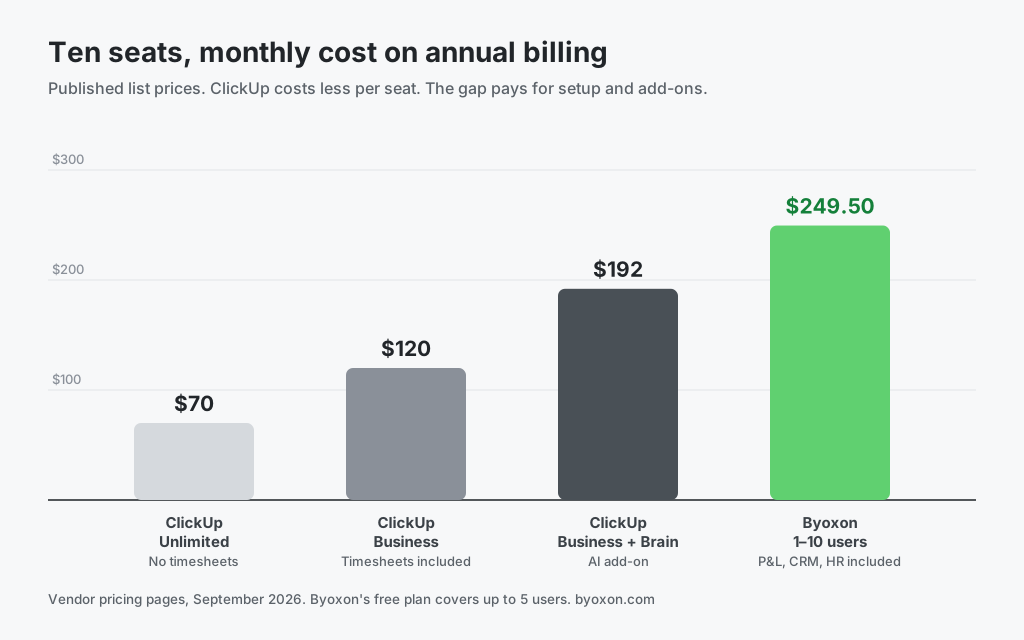
It costs far less per seat. ClickUp Business is $12 per user per month on annual billing against $24.95 for Byoxon’s smallest tier. For a ten-person team that is $120 a month against $249.50. If budget is the binding constraint, this gap is decisive and no amount of feature argument closes it.
It is far broader as a workspace. Docs, whiteboards, mind maps, chat, sprint points, goals and a large automation engine all ship inside ClickUp. Byoxon does not attempt to match that surface area. If your team wants one tool for every kind of work, ClickUp is built for exactly that.
It is more configurable. Custom fields, formula fields, over ten views and a deep template library mean you can shape ClickUp around an unusual process. A rigid product cannot do that.
Its free plan is more generous on headcount. ClickUp Free carries unlimited tasks and unlimited members. Byoxon’s free plan stops at five users, though it removes no features.
Two corrections to claims you may read elsewhere. ClickUp does include native time tracking, and it is available on paid plans rather than sold as an add-on. ClickUp does support CRM work through lists, custom fields and pipeline views. Neither capability is absent. The difference is in how much of it arrives pre-built.
The unit-economics gap: assembled versus shipped
ClickUp gives you the raw materials for measuring project profitability. The finished measurement is not included. Everything between the two is work your team owns.

What you assemble in ClickUp
To get one reliable margin figure per project in ClickUp, a team typically does the following work.
- Turn on time tracking, and move to the Business plan if you need timesheets, time estimates and billable reports.
- Create custom fields for the client bill rate and for each person’s internal cost. ClickUp has no built-in per-person cost rate, so this becomes data you enter and maintain by hand.
- Write formula fields that turn hours, rates and costs into revenue, cost and margin. ClickUp’s own guidance is that profitability is calculated at task level with a formula field. Formula fields also cannot read text custom fields, which constrains how you model the inputs.
- Build dashboard widgets to roll those task-level numbers up to project, client and portfolio level. Unlimited dashboards sit on the Business plan.
- Export the hours to an accounting tool to actually bill the client, because ClickUp has no native invoicing module.
None of that is unreasonable. Plenty of agencies have built it and are happy with the result. But it is a build, and a build has an owner. When a rate changes, when someone joins, or when a formula silently returns a wrong value, someone on your team fixes it. Assigning internal unit costs per person is an open request on ClickUp’s public feedback board, which tells you it is not native today.
What ships pre-built in Byoxon
Byoxon inverts the order. A person’s cost rate is a field the product already holds, so nobody has to maintain it as a custom field. The product calculates revenue, labour cost, billable utilisation and margin from the hours people log. The project P&L is a report you open, not a dashboard you design.
The tradeoff is real and runs both ways. A pre-built calculation is faster to reach and cheaper to maintain. It is also less bendable. If your margin model is unusual, ClickUp’s formula fields will accommodate it and Byoxon’s fixed model may not.

Note the last row. ClickUp beats Byoxon outright on docs, whiteboards, chat and automation depth. This is not a table where one product wins everything.
Skip the formula-building and look at a real margin
Start free with up to 5 users and no feature limits. Load one live project into BeOnBoard and compare its margin against the number your current dashboard reports. Prefer a walkthrough first? Request a demo and we will show you the P&L view on your kind of project.
Pricing: read the whole bill, not the headline seat rate
ClickUp publishes four tiers. Annual billing is materially cheaper than monthly.
| ClickUp plan | Annual, per user / month | Monthly, per user / month | Notable inclusions |
|---|---|---|---|
| Free Forever | $0 | $0 | Unlimited tasks and members, 60MB storage |
| Unlimited | $7 | $10 | Time tracking, Gantt, goals, resource management, unlimited storage |
| Business | $12 | $19 | Timesheets, billable reports, unlimited dashboards, portfolio workload, SSO, 5,000 automations |
| Enterprise | Custom | Custom | Custom roles, SAML SSO, audit logs, 250,000 automations, data residency |
Two items sit outside those rates. AI is a separate purchase: ClickUp Brain is listed at $9 per user per month, or $7.20 on annual billing, with a higher Everything AI tier above it. And the tier that carries timesheets and billable reporting is Business, not Unlimited, so a team that needs billable time is comparing against $12 rather than $7.
Byoxon uses volume-based per-user pricing with no usage component and no AI add-on:
| Team size | Price per user / month |
|---|---|
| 1–10 users | $24.95 |
| 11–49 users | $21.95 |
| 50–199 users | $18.95 |
| 200+ users | $15.95 |
| Free plan | $0 for up to 5 users, no feature limitations |
Byoxon is more expensive per seat than ClickUp’s annual rates at every published comparison point. Be honest about what the difference buys: invoicing, CRM and HR that you would otherwise license or build, plus a margin calculation nobody on your team owns. Whether that is worth roughly $58 a month for ten seats depends on what those functions cost you today. Price the whole stack, not the two line items.
Which tool fits your team
Choose ClickUp if
- Per-seat cost is the deciding constraint
- You want one workspace for tasks, docs, whiteboards and chat
- Someone on your team enjoys configuring systems and will own the formulas
- Your margin model is unusual and needs custom logic
- You already run invoicing, CRM and HR in tools you intend to keep
Choose Byoxon if
- You want project margin without building or maintaining the calculation
- Unit economics per project drive how you price new work
- You are consolidating time, invoicing, CRM and HR into one subscription
- You have no internal owner for a custom-field and formula system
- You need time tracking on every tier rather than only the mid plan
If you are still mapping the market, our Byoxon vs monday.com comparison covers the same build-it-yourself question in another general work platform, and Byoxon vs Harvest covers the time-and-invoicing end of the spectrum. You can also model your own numbers with the free time tracking calculator or read how Byoxon handles project cost management.
Frequently asked questions
Does ClickUp have built-in time tracking?
Yes. ClickUp includes native time tracking with timers and manual entry, and it is available on paid plans rather than sold separately. The advanced pieces sit higher up: timesheets, time estimates and billable reports are Business-tier features. Byoxon includes timesheets and billable time on every tier.
Can ClickUp calculate project profitability?
It can, but you build the calculation. ClickUp’s guidance is to hold rate and cost figures in custom fields at task level and compute margin with a formula field, then aggregate through dashboard widgets. There is no built-in per-person internal cost rate, so those numbers are maintained by hand. Byoxon ships the P&L pre-built and updates it from tracked time.
Does ClickUp send invoices?
Not natively. ClickUp offers invoice templates and formula fields to compute invoice totals inside a list, but it has no invoicing module that issues and delivers a client invoice. Teams export hours to an accounting tool or connect one through an integration. Byoxon includes invoicing on every plan with hourly, monthly and fixed-project billing.
How much does ClickUp cost in 2026?
ClickUp lists Free Forever at $0, Unlimited at $7 per user per month and Business at $12 per user per month on annual billing. Monthly billing raises those to $10 and $19. Enterprise is custom-quoted. ClickUp Brain, the AI layer, is a separate add-on at $9 per user per month, or $7.20 with annual billing.
Why does Byoxon cost more per user than ClickUp?
Byoxon’s price covers time tracking, real-time project P&L, invoicing, CRM and HR in one subscription, so the fair comparison is against your combined tool spend and setup effort rather than against ClickUp alone. If ClickUp already covers your needs and you have someone to maintain the formulas, ClickUp is the cheaper answer and we would tell you so.
The bottom line
ClickUp is an excellent general work platform, and it is cheaper per seat than Byoxon by a wide margin. If you want maximum flexibility and you have someone willing to own the configuration, it will serve you well.
Byoxon answers a narrower question and answers it without setup: are we making money on this project, right now? It reaches that number out of the box, and carries invoicing, CRM and HR alongside it.
Run both against your own numbers. If your current margin figure lives in a spreadsheet that one person understands, that dependency is what Byoxon removes.
Start free with up to 5 users. No feature limits. Load one live project into Byoxon and compare its margin against what your current stack tells you.