Product Comparison
Byoxon vs. NetSuite OpenAir: Lightweight PSA for Agile Tech Teams
Oracle renamed NetSuite OpenAir to NetSuite SuiteProjects Pro in 2025. The software did not change; the label did. For an agile software or IT team, two things decide the fit: deployment weight and pricing transparency, meaning how long a rollout runs and whether you can find the price before a sales call. This comparison sets Byoxon (BoB) against both names, marks where a heavyweight PSA still wins, and where a small team gets project margin without the multi-month rollout.
NetSuite OpenAir is one of the longest-running professional services automation platforms on the market. It manages projects, resources, timesheets, expenses, purchases, invoices, and reporting for services organizations, and it connects to NetSuite financials.
Byoxon starts from a smaller problem. Its product, BeOnBoard (BoB), gives a software or IT team live project profit and loss, plus CRM and HR functions, on a published per-user price and a self-serve signup.
Both tools do real PSA work. The honest difference is weight: how much setup, budget, and internal process each one asks for before it returns a useful number.
First, the name: OpenAir is now SuiteProjects Pro
If you are searching for OpenAir and finding a different product name, nothing is wrong. Oracle’s documentation states that OpenAir is now SuiteProjects Pro, and that as of 15 February 2025 service URLs on the netsuitesuiteprojectspro.com domain replaced openair.com URLs for all accounts.
The rename is not a replacement. The applications, the data model, and the customer base carried over. Treat OpenAir and SuiteProjects Pro as the same product under two names, and use the new name when you read release notes.
One more naming trap matters. NetSuite also ships a native module called SuiteProjects inside the ERP. That is a different, lighter thing than SuiteProjects Pro. Confirm which one a quote covers before you sign.
Byoxon vs. NetSuite SuiteProjects Pro at a glance
| Capability | BoB (Byoxon) | NetSuite SuiteProjects Pro (formerly OpenAir) |
|---|---|---|
| Published price | Yes — $24.95 to $15.95 per user per month by team size | No public rate card; pricing is quoted |
| Free plan | Up to 5 users, no feature limitations | None listed; no free trial listed on major software directories |
| Signup | Self-serve | Sales-led |
| Typical time to deploy | Days, without a consultant | Third-party guides cite roughly 8–16 weeks |
| Time and expense tracking | Included | Included — Timesheets and Expenses applications |
| Project profitability | Real-time P&L at every paid tier | Yes — margin, utilization, and budget-vs-actual reporting |
| Resource management | Assignment, capacity, and utilization | Deep — skills, roles, education, industry experience, location |
| Billing and invoicing | Included | Included, with enterprise billing rules |
| Pipeline / new business | Built-in CRM with pipeline stages and deal tracking | Opportunities application for prospective business |
| Purchasing workflow | Vendor management | Purchases application, request to receipt |
| HR, PTO, recruitment | Employee profiles, PTO requests, recruitment | Not the product’s focus; handled in NetSuite or a separate HR system |
| ERP financials | Not an ERP; exports and integrations | Native path into NetSuite financials |
| Best fit | Agile software and IT teams that need margin fast | Large services organizations with complex finance |
Byoxon figures come from the Byoxon pricing page in September 2026. SuiteProjects Pro application names come from Oracle’s product documentation. Deployment and price ranges for SuiteProjects Pro come from third-party guides and software directories, because NetSuite does not publish rates. Verify every number with NetSuite before you buy.
Where NetSuite SuiteProjects Pro is the better choice
Start here, because the answer is often SuiteProjects Pro. It is a mature enterprise platform, and several of its strengths are ones Byoxon does not try to match.
- You already run NetSuite ERP. SuiteProjects Pro feeds project data into NetSuite financials natively. If your general ledger, subsidiaries, and revenue recognition already live there, that path is worth real money.
- You have complex, regulated billing. Multi-currency, multi-subsidiary, milestone and fixed-fee arrangements, and formal revenue recognition are what this platform was built for.
- You staff from a large bench. The Resources application stores skills, job roles, education, industry experience, and location. At two hundred consultants, that depth is not a luxury.
- You need a formal purchasing flow. The Purchases application covers request through fulfilment and receipt inside the same system.
- You want one enterprise vendor. A single Oracle relationship, with support and a partner network, has value that no rate card shows.
If two or more of those describe you, evaluate SuiteProjects Pro first. Byoxon is the wrong shape for that problem.
Lightweight, flexible, affordable: what the difference actually is
SuiteProjects Pro has more modules than Byoxon. That is not the argument. The question is what an agile tech team pays, in setup time and fees, to reach the number it needs.
Deployment weight
Enterprise PSA rollouts are projects in themselves. Third-party implementation guides put SuiteProjects Pro at roughly eight to sixteen weeks, and firms migrating from legacy systems often engage an implementation partner. Scoping, billing-rule configuration, data migration, testing, and training each consume calendar time.
A twenty-person development shop rarely has that runway. It needs to know this quarter whether the fixed-price integration project is still above water. Byoxon is built so that a delivery lead can sign up, load people, projects, and cost rates, and read a margin figure in the same week.

Flexibility that does not need a consultant
SuiteProjects Pro is highly configurable. That is a genuine strength, and it is also the cost: configuration depth usually means a person who knows the platform. Rate cards, approval routing, and billing rules are administrator work.
Byoxon trades some of that ceiling for reach. Fewer knobs exist, and the ones that matter to a software team get set by the person who runs delivery: person cost rates, billable rates, project budgets, utilization targets. When a client changes scope mid-sprint, you adjust the project and the P&L moves. You do not file a ticket.
Cost you can check before a sales call
Byoxon publishes its rate ladder. You can budget your PSA line before you speak to anyone. SuiteProjects Pro is quoted, and public third-party listings vary so widely that they are not a reliable planning input.
For a small team, that gap is practical rather than philosophical. A five-person team can start on the free plan, prove the margin report on a live project, and only then decide what to spend.
If you are still mapping the market, our Byoxon vs Kantata comparison covers the other enterprise PSA end of this spectrum, and Byoxon vs Clockify covers the lightweight end. You can also model your own figures with the free time tracking calculator, or read how Byoxon handles project cost management.
Get a margin number before the rollout, not after it
Start free with up to 5 users. No feature limits, no consultant, no implementation phase. Load one live project with real cost rates and read the P&L this week. Comparing against an enterprise PSA quote? Request a demo and we will walk the same numbers with you.
Pricing: a published ladder against a quoted range
Byoxon uses volume-based per-user pricing with no usage component:
| Team size | Price per user / month |
|---|---|
| 1–10 users | $24.95 |
| 11–49 users | $21.95 |
| 50–199 users | $18.95 |
| 200+ users | $15.95 |
| Free plan | $0 for up to 5 users, no feature limitations |
NetSuite does not publish a SuiteProjects Pro rate card. We checked, and we will not invent one. Public third-party sources disagree sharply: one major software directory lists a starting price of $399 per user per month, while consultancy guides describe roughly $50 to $100 per user per month for SuiteProjects Pro and $25 to $50 for the older OpenAir SRP configuration. Those figures are secondhand, and none of them is a quote.
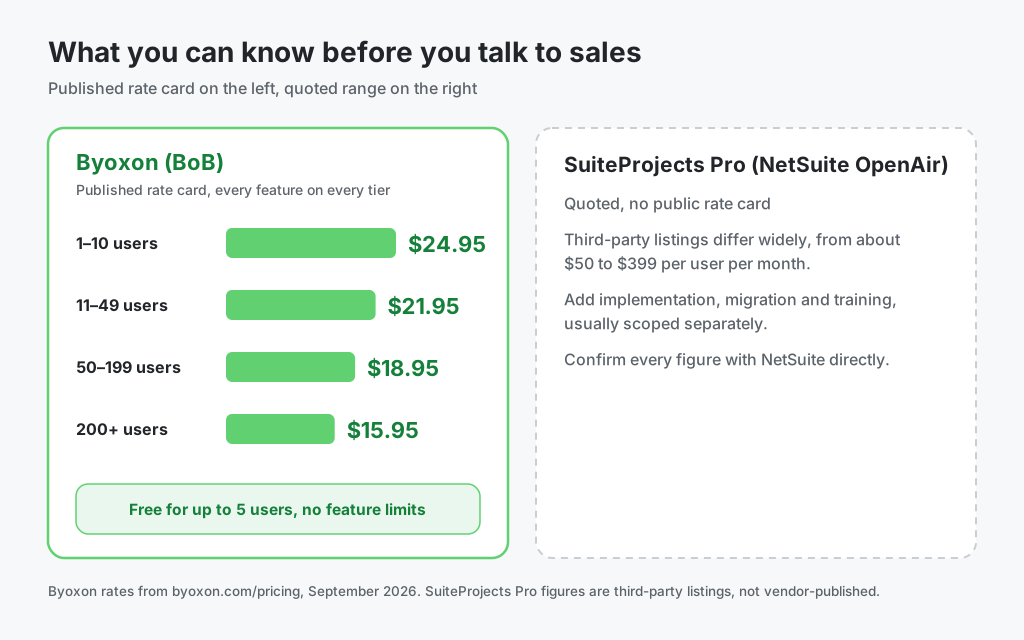
Two practical points follow. First, licence cost is not total cost for either product: implementation, migration, and training are usually scoped separately on an enterprise PSA. Second, a quoted price is not a bad price. Enterprise buyers often negotiate below list. It is simply a price you cannot check on a Tuesday afternoon while building next year’s budget.
Which platform fits your team

Choose NetSuite SuiteProjects Pro if
- NetSuite ERP is already your system of record.
- You run multiple subsidiaries, currencies, or formal revenue recognition.
- You staff a large bench and need skills-based resource matching.
- You have a budget and a timeline for a proper implementation.
- Procurement prefers one enterprise vendor with a partner network.
Choose Byoxon if
- You run a software, IT, or engineering team of roughly 5 to 200 people.
- You need project margin this month, not after a rollout.
- You want a price you can look up and plan against.
- You would rather run CRM, delivery, and HR in one system than integrate three.
- Nobody on the team wants to become a PSA administrator.
If you are replacing spreadsheets and a standalone timer, see how Byoxon handles employee timesheets as the input layer to the same P&L.
Frequently asked questions
Is NetSuite OpenAir discontinued?
No. Oracle renamed it. OpenAir is now NetSuite SuiteProjects Pro, and since 15 February 2025 all accounts use service URLs on the netsuitesuiteprojectspro.com domain instead of openair.com. The product and its applications continued through the change.
How much does NetSuite SuiteProjects Pro cost?
NetSuite does not publish a rate card, so the accurate answer is that you have to ask for a quote. Third-party listings differ widely, from roughly $50 per user per month in consultancy guides to $399 per user per month on one software directory. Budget separately for implementation, data migration, and training.
Can SuiteProjects Pro run without NetSuite ERP?
It can operate as a standalone PSA, and it ships connectors to other systems. Independent guides note that a standalone deployment gives up its main advantage, which is the native link to NetSuite financials. If you have no plan to run NetSuite ERP, weigh that carefully.
Is Byoxon a full replacement for SuiteProjects Pro?
For many mid-sized tech teams, yes. Byoxon covers time tracking, projects, resourcing, invoicing, and real-time P&L, and adds CRM and HR. It is not a replacement for enterprise revenue recognition, multi-subsidiary accounting, or a native NetSuite general ledger link. Those are ERP-class requirements.
Can I try Byoxon before paying?
Yes. Byoxon offers a free plan for up to five users with no feature limitations. Load one live project with real cost rates and compare the margin figure against your current spreadsheet before you commit.
The bottom line
NetSuite SuiteProjects Pro is a serious platform for serious scale. If you run NetSuite, staff a large bench, and carry enterprise finance requirements, it earns its weight.
Byoxon answers a narrower question faster: is this project making money right now, and what is it costing us to deliver? An agile tech team gets that answer in days, on a price it can look up, without hiring anyone to run the tool.
Start free with up to 5 users. No feature limits. Run one live project through BeOnBoard and compare the margin figure against what your current stack tells you.