Product Comparison
Byoxon vs. Clockify: Deeper Utilization Metrics for Scaling Software Teams
This article compares Byoxon (BoB) and Clockify for software and IT service teams that are growing past ten or twenty billable people. It covers Clockify’s 2026 plans, including the new five-user cap on its free plan, explains how each tool measures utilization, and shows why the same utilization rate can hide very different margins per person.

Clockify is one of the most widely used time trackers in the world. It is quick to roll out, its paid plans are inexpensive, and its Pro plan goes well beyond a timer: scheduling, forecasting, expenses, budgets, and labor cost and profit reporting are all on the price list.
Byoxon’s product, BeOnBoard (BoB), starts from a different question. It treats every tracked hour as an input to a live profit-and-loss report, and it keeps the people records behind that hour (rates, salaries, bonuses and PTO) in the same system, next to a CRM and invoicing.
For a five-person team, the difference hardly matters. For a software team that is scaling, it decides whether “utilization” means hours logged against capacity or money earned per person. This comparison is about that second meaning, and about where Clockify is honestly the better buy.
Byoxon vs Clockify at a glance
| Capability | BoB (Byoxon) | Clockify |
|---|---|---|
| Free plan | Up to 5 users, no feature limitations | Up to 5 users, unlimited tracking, 1-month report range |
| Entry paid price | $24.95/user/month (1–10 users) | $3.99/seat/month (Basic, billed annually) |
| Price for profit reporting | $24.95/user/month, or free up to 5 users | $7.99/seat/month (Pro, billed annually) |
| Timer and manual entry | Yes | Yes |
| Automatic app tracking | Not offered | Auto tracker, visible only to the user |
| Billable vs non-billable reports | Yes | Yes, Summary report |
| Rates per person per project | Individual rate per project team member | Billable rates from Basic, task rates from Standard |
| Labor cost per person | Hourly rates, salaries, bonuses and PTO per employee | Labor cost hourly rates, Pro and up |
| Profit reporting | Real-time P&L by project, employee, client and category | Labor cost and profit, Pro and up |
| Forward-looking view | Current-month P&L projection | Project forecasting, Pro and up |
| Scheduling timeline | Not offered; team calendar only | Scheduling, Pro and up |
| Invoicing | Included, with contractor and vendor billing | Standard and up |
| CRM and deal pipeline | Built in | Not offered |
| PTO and time off | PTO requests and approvals | Time off, Standard and up |
| Screenshots | Not published | Optional, Pro and up |
| GPS location tracking | Yes | Optional, Pro and up |
| SSO and audit log | Not published | Enterprise |
Sources: Clockify’s pricing page and learning resources, and byoxon.com, checked on September 19, 2026. Confirm current numbers before you buy.
Where Clockify is the better choice
Start with the parts of this decision that favor Clockify. They are real, and several of them are large.
- Clockify costs far less per seat. Ten people on Clockify Pro pay $79.90 a month with annual billing, and Pro already includes labor cost and profit. The same ten people on Byoxon pay $249.50.
- Clockify plans capacity ahead. Its Pro scheduling puts projects on a timeline, shows who is available, and compares scheduled time with tracked time. Byoxon does not offer a scheduling planner of that kind.
- Clockify captures time with less effort. The auto tracker records the apps and websites a person uses, and the browser extension starts a timer inside more than 90 web apps. Byoxon relies on timers and manual entry.
- Clockify has more enterprise controls. SSO, SCIM provisioning, an audit log and a choice of data region are published features. Byoxon does not list them.
Two corrections to an earlier version of this page. Clockify’s free plan is no longer unlimited: it now covers up to five users. And Clockify Pro does report labor cost and profit, so the difference below is about where the cost figure comes from, not whether a profit figure exists.
If you want accurate hours, capacity planning and a basic profit view at the lowest possible price, Clockify Pro is hard to beat. The rest of this article is for teams whose harder question is what each person’s time is worth.
Deeper utilization metrics for scaling software teams
Utilization is usually defined as billable hours divided by available hours. It is a useful number, and it is the first one that breaks as a software team grows. At ten people, a founder knows who is on which client. At forty, with several rate cards, retainers and a bench, an 85% utilization rate can describe a very healthy person or a loss-making one.
How Clockify measures utilization
Clockify’s own guide to utilization reporting is candid: there is no single feature called a utilization report. You build the picture from the Summary report, which splits billable and non-billable hours, together with a daily capacity per team member. On Pro, you add labor cost rates to see what you pay against what you charge, and scheduling to compare planned hours with tracked hours.
That is a capable toolkit. Its limit is the cost side. A Clockify labor cost is an hourly rate that somebody types in for each user or project. It does not know about salary changes, bonuses, paid time off or company overheads unless you fold them into that rate by hand and keep it current.

What Byoxon adds to the same hour
Byoxon reads the cost from the people records it already holds. Its Rates Report tracks hourly rates, salaries, bonuses and PTO for every employee. Projects carry an individual rate for each project team member, so one developer can bill $110 on one client and $60 on another. The P&L then reports gross sales, labor expenses and average salary, and it tracks profit in real time by project, employee, client and category.
- Margin per person, not only hours per person. Labor profit margins are available by day, project, individual resource and category.
- Seniority mix per project. You see how work splits between junior and senior people, which is where software margins usually leak.
- Company costs in the picture. The “Sales to Expenses” view compares income with expenses, and a projection estimates the current month before it closes.
- Client visibility. Clients can get permission-based access to their team’s time records and cost reports.
Same utilization, different margin: a worked example
Take two developers in the same month. The figures are illustrative, not customer data. Each has 160 available hours and logs 136 billable hours, so both show 85% utilization.
| Measure | Developer A | Developer B |
|---|---|---|
| Billable hours / available hours | 136 / 160 | 136 / 160 |
| Utilization | 85% | 85% |
| Billed work | 136 h at $90 | 96 h at $60 (legacy retainer) + 40 h at $110 |
| Revenue | $12,240 | $10,160 |
| Fully loaded cost (160 h) | $8,000 at $50/h | $9,920 at $62/h |
| Margin | $4,240 (34.6%) | $240 (2.4%) |
A utilization dashboard rates these two people as equal. The margin view shows that Developer B, the more senior engineer, is mostly spending time on a retainer priced below their cost. Clockify Pro can produce this figure too, if the $62 cost rate is right and someone maintains it. Byoxon produces it from the salary, bonus and rate records it already holds, and it updates as hours are logged.
Pipeline and people in the same system
Scaling teams also need to know what is coming. Byoxon’s built-in CRM tracks deals through pipeline stages, and custom web contact forms feed leads into it, so upcoming work sits next to current margin. HR functions cover PTO requests, recruitment and onboarding. Clockify has no CRM, and its CAKE.com bundle adds project management and team chat, not a sales pipeline.
The honest tradeoff: a bundled platform is rarely the best tool at every function. If you already run a CRM and an HR system you like, compare Byoxon with Clockify plus those tools, not with Clockify alone.
See margin per person on your own team
Start free with up to 5 users — no feature limits. Put one project team into BeOnBoard and compare margin per person with the utilization figure your current tracker shows. Prefer a walkthrough first? Request a demo and we will show you the P&L view on a software team like yours.
Pricing: per-seat plans vs one per-user plan
Clockify publishes five paid options on its pricing page. Every active or invited user takes a paid seat, and a 7-day trial of Pro features needs no credit card.
| Clockify plan | Annual, per seat / month | Monthly, per seat / month | What the plan adds |
|---|---|---|---|
| Free | $0 | $0 | Up to 5 users, unlimited tracking, 1-month report range |
| Basic | $3.99 | $4.99 | Billable rates, kiosk, time for others, bulk edit |
| Standard | $5.49 | $6.99 | Invoicing, approvals, time off, task rates, QuickBooks |
| Pro | $7.99 | $9.99 | Scheduling, forecasting, expenses, labor cost and profit, budgets |
| Enterprise | $11.99 | $14.99 | SSO, SCIM, audit log, custom subdomain |
| CAKE.com Bundle | $12.99 | $15.99 | Enterprise features plus Plaky and Pumble |
Byoxon uses volume-based per-user pricing with one feature set:
| Team size | Price per user / month |
|---|---|
| 1–10 users | $24.95 |
| 11–49 users | $21.95 |
| 50–199 users | $18.95 |
| 200+ users | $15.95 |
| Free plan | $0 for up to 5 users, no feature limitations |
Monthly cost at three team sizes:
| Option | 5 users | 10 users | 25 users |
|---|---|---|---|
| Clockify Pro, billed annually | $39.95 | $79.90 | $199.75 |
| Clockify Pro, billed monthly | $49.95 | $99.90 | $249.75 |
| Clockify Enterprise, billed annually | $59.95 | $119.90 | $299.75 |
| Byoxon BoB | $0 (free plan) | $249.50 | $548.75 |
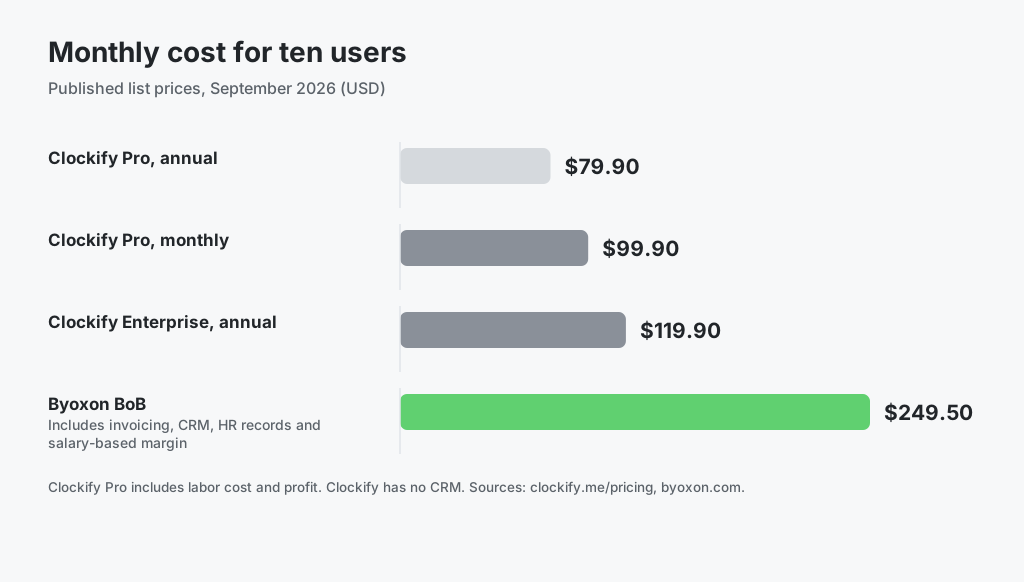
On price per seat, Clockify wins clearly. At ten users, Clockify Pro on annual billing costs $169.60 a month less than Byoxon. That gap only narrows when the comparison includes the CRM and HR tools a Clockify team would pay for separately, and it does not close if you already own them.
Very small teams see the opposite. Clockify’s free plan now covers up to five users with a one-month report range and no profit reporting, so a five-person team that wants margin figures pays $39.95 a month for Pro. Byoxon’s free plan covers the same five users with every feature, including the P&L.
Which tool fits your team
Choose Clockify if
- Per-seat cost is the deciding constraint
- You plan capacity weeks ahead on a scheduling timeline
- You want automatic time capture or optional screenshots
- You need SSO, SCIM or an audit log
- You already own a CRM and an HR system you intend to keep
Choose Byoxon if
- You need margin per person, not only utilization per person
- Your people bill different rates on different projects
- You want salaries, bonuses and PTO to feed the cost figure automatically
- You want the sales pipeline, invoicing and HR records in the same system as the P&L
- You are a team of five or fewer that wants profit reporting at no cost
For other timesheet-first tools, see Byoxon vs Harvest and Byoxon vs Toggl Track. You can also estimate your own figures with the free time tracking calculator, or read how Byoxon handles project cost management.
Frequently asked questions
Is Clockify still free for unlimited users?
No. As of September 2026, Clockify’s pricing page describes the free plan as “for up to 5 users” with unlimited tracking, and its FAQ says you can invite up to four people for free. Reports on the free plan cover a one-month data range. Larger teams need a paid plan from $3.99 per seat per month billed annually.
Does Clockify have a utilization report?
Not as a single report. Clockify’s own guide says there is no feature named utilization rate. Teams combine the Summary report’s billable and non-billable split with a daily capacity per member, and on the Pro plan add labor cost and profit and scheduling to compare planned with tracked time.
Does Clockify track profit?
Yes. The Pro plan at $7.99 per seat per month billed annually adds labor cost hourly rates for projects and users, so you can compare what you pay the team with what you charge clients. Byoxon differs in where the cost comes from: salaries, bonuses and PTO held in its HR records, plus expenses and a current-month projection in the P&L.
Why does Byoxon cost more per user than Clockify?
Byoxon’s price covers time tracking, invoicing, a real-time P&L, a CRM and HR functions in one plan, so the fair comparison is your combined tool spend. If you only need time tracking and a basic profit view, Clockify Pro is the cheaper choice by a wide margin.
Can I try Byoxon before paying?
Yes. Byoxon’s free plan covers up to five users with no feature limitations, so you can run a live project through the P&L and the margin-per-person view before you commit.
The bottom line
Clockify is an excellent, inexpensive time tracker, and its Pro plan adds more planning and profit reporting than its reputation as a free timer suggests. For many teams it is the right answer.
Byoxon is built for the point where utilization stops being enough. When a software team has several rate cards, a mix of senior and junior engineers, and a pipeline to staff, the useful number is what each person’s time earns after their real cost. Byoxon calculates that from records it already holds, and keeps the pipeline and invoices next to it.
Start free with up to 5 users — no feature limits. Put one project team into Byoxon and compare its margin per person with the utilization figure you see today.