Product Comparison
Byoxon vs. monday.com: Built-In P&L vs. Custom Formula Building
Seeing whether a project makes money takes configuration on one platform and nothing on the other. This comparison covers current pricing for both, what monday.com’s Pro-tier time tracking and formula columns actually give you, and where a purpose-built professional services platform reports margin without any formula building at all.
monday.com is one of the most widely adopted work operating systems in the world. It is genuinely good software. Boards are quick to build, the automation engine is strong, and the app marketplace is deep. Teams in marketing, HR, operations and engineering all run on it.
Byoxon starts from a narrower premise. Its product, BeOnBoard (BoB), is built for professional services firms: agencies, software consultancies, IT teams that bill for delivery. It treats tracked hours as an input to a live profit-and-loss statement, and ships the rate model, cost model and margin report already assembled.
That difference shows whenever you ask a financial question. monday.com can answer it. What the answer costs you is configuration, plus whichever plan tier holds the pieces you need. Below: pricing on both sides, and the cases where monday.com is clearly the better purchase.
Byoxon vs monday.com at a glance
| Capability | BoB (Byoxon) | monday.com work management |
|---|---|---|
| Entry paid price | $24.95/user/month (1–10 users) | $9/seat/month (Basic, billed annually) |
| Highest published tier | $15.95/user/month (200+ users) | $19/seat/month (Pro, billed annually); Enterprise is quoted |
| Free plan | Up to 5 users, no feature limitations | Up to 2 seats, 3 boards |
| Time tracking | Included on every plan | Time Tracking column, Pro and Enterprise only |
| Formula / calculated fields | Not needed — the financial logic is pre-built | Formula column, Pro and Enterprise only |
| Billable and cost rates per person | Native, part of the data model | Model it yourself with your own columns |
| Project P&L report | Built in, real time, no setup | Build it from formula columns and dashboard widgets |
| Invoicing | Included | Not native — use a marketplace app or an external tool |
| Boards per dashboard | Not applicable | 1 (Free), 5 (Standard), 20 (Pro), 50 (Enterprise) |
| Automation volume | Not a metered feature | 250/month (Standard), 25,000 (Pro), 250,000 (Enterprise) |
| CRM / deal pipeline | Included in the same subscription | monday CRM, a separate product with separate seats |
| HR, PTO, recruitment | Employee profiles, PTO requests, recruitment, surveys | Build it on boards, or buy monday service |
| Best fit | Service firms that need margin visibility during delivery | Any team that wants a flexible, configurable work platform |
Pricing above comes from each vendor’s own pricing page as of September 2026. monday.com prices differ per product and per billing period. Monthly billing costs more than the annual rates shown. Verify current numbers before you buy.
Where monday.com is the better choice
Take this section seriously before reading the rest. monday.com wins on several dimensions, and some of them are decisive.
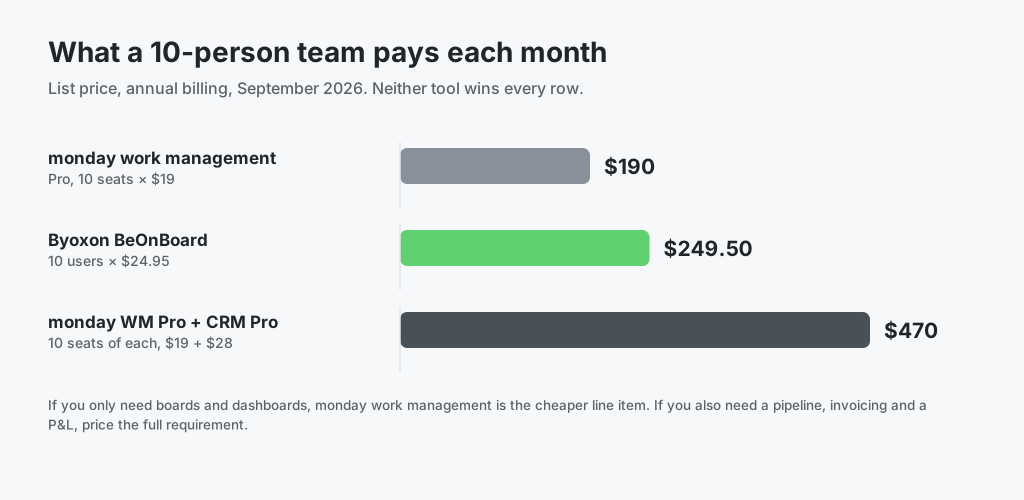
- monday.com costs far less per seat at ten seats. Ten seats on Pro is $190 per month on annual billing. Ten users on BeOnBoard is $249.50 per month. That is not a rounding difference, and no feature argument erases it.
- monday.com bends to any workflow. If your teams run processes no vertical tool anticipates: content calendars, hiring loops, inventory, event planning. A configurable board platform is the right shape. BeOnBoard is opinionated about services delivery and does not try to be general.
- The automation and integration catalogue is much larger. Pro allows 25,000 automation actions a month and Enterprise 250,000. The app marketplace covers hundreds of connectors. If your requirement is “connect everything,” monday.com is stronger.
- Adoption is easier across non-billable teams. Marketing, support and operations staff will recognise monday.com’s interface. A services-delivery finance platform is a harder sell to a team that never touches a timesheet.
If the list above describes you, buy monday.com. Read on only if the problem below is one you actually have.
Out-of-the-box P&L vs. formula columns you build yourself
What monday.com genuinely provides
Be accurate here, because the lazy version of this argument is wrong. monday.com has the ingredients for profitability tracking. Here is the list:
- A Time Tracking column that logs hours against items, on the Pro and Enterprise plans.
- A Formula column that multiplies, subtracts and aggregates across other columns, also on Pro and Enterprise.
- Numbers columns for rates, costs and budgets, which you define yourself.
- Dashboard widgets that roll figures up across connected boards.
- A marketplace of third-party apps, including invoicing and quoting add-ons.
A capable operations lead can construct project margin reporting inside monday.com. Plenty of agencies have done exactly that. It is a real, working answer, and this article does not claim otherwise.
What that answer costs you
The licence fee is the small part. The build costs more, and so does the upkeep. To get from “we track hours” to “we know our margin,” you own these decisions:
- Where the billable rate lives. Per person, per role, or per client? You design the schema.
- Where the internal cost rate lives, and who may see it. Private boards start at the Pro tier.
- A formula on every board that needs the calculation. Add a board, repeat the work.
- A dashboard that aggregates them, within the connected-board ceiling of 20 boards on Pro.
- An export or integration that turns the result into an invoice, because monday.com does not issue invoices natively.
Each step is achievable. Together they form a small internal product that usually one person fully understands, and that breaks without warning when a rate changes or somebody restructures a board. That is the real risk. monday.com can compute margin. Keeping the computation correct is your job, not the platform’s.

What BeOnBoard ships already assembled
BeOnBoard makes the financial model part of the schema rather than something you express in formulas. Billable rates, internal cost rates, project budgets and expenses are first-class fields. Because the platform already knows what revenue and cost mean, it reports on them without instruction:
- Real-time profit and loss per project and per client.
- Unit economics: what an hour of a given role earns after cost.
- Monthly P&L projections based on committed allocations.
- Invoicing driven from the same hours, with hourly, monthly and fixed-project billing models.
- Expense and vendor cost tracking that lands in the same margin figure.
Nobody authors a formula. Nobody maintains one. When a rate changes, every report changes with it. If you want to check the arithmetic before evaluating any platform, our free time tracking calculator works through the same numbers on a single project. The same principle drives our wider approach to project cost management: model cost once, report on it everywhere.
See your margin without writing a single formula
Start free with up to 5 users. No feature limits, and no Pro-tier gate on time tracking. Run one live project through BeOnBoard and compare its P&L against the number your current setup reports. Prefer a walkthrough first? Request a demo and we will show you the margin view on your kind of project.
Pricing compared honestly
monday.com work management lists at $9, $12 and $19 per seat per month on Basic, Standard and Pro when billed annually, with Enterprise quoted individually. Monthly billing costs more. The free plan supports two seats and three boards.
Byoxon uses volume-based per-user pricing with no tier ladder. Every user gets every feature:
| Team size | Price per user / month |
|---|---|
| Up to 5 users | Free |
| 1–10 users | $24.95 |
| 11–49 users | $21.95 |
| 50–199 users | $18.95 |
| 200+ users | $15.95 |
Compare like with like. If you need boards and dashboards only, monday.com is materially cheaper and you should buy it. The comparison changes once your requirement includes a deal pipeline, invoicing and a margin report, because on monday.com those arrive as separate products or separate tools.
One platform against four products
monday.com sells work management, CRM, dev and service as distinct products. Each carries its own plan tiers and its own seats. At the Pro tier the annual list rates are $19, $28, $20 and $45 per seat per month respectively, and the service product starts at $31 on its Standard tier.
That structure is a genuine strength when a company wants one product only. It becomes a cost and an integration problem when a services firm wants its pipeline, its delivery and its financials to reconcile. Revenue signed in one product has to meet delivery hours logged in another before anyone can compute margin.
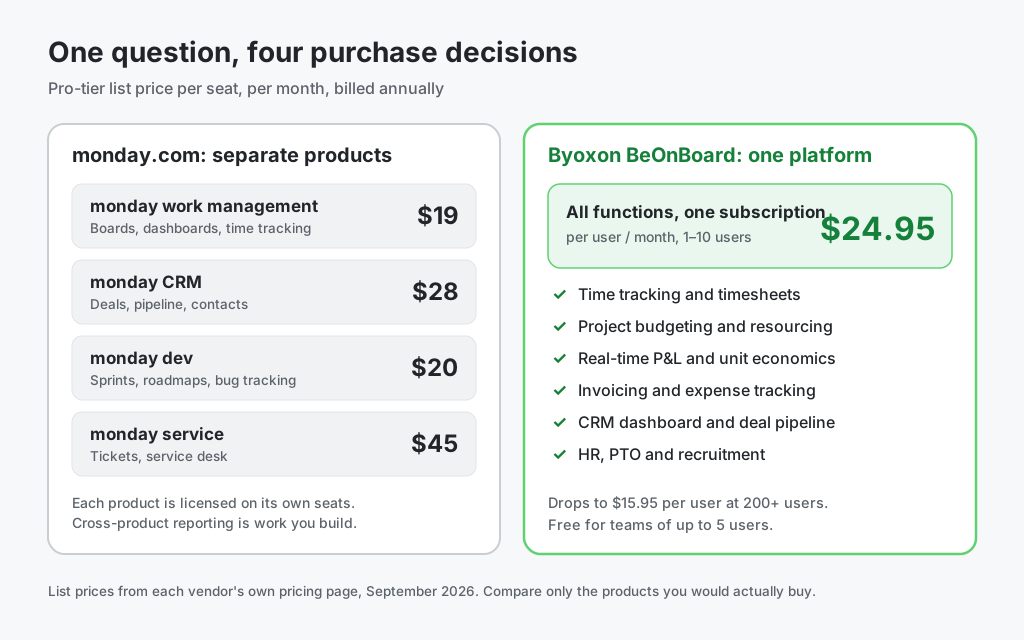
BeOnBoard covers time tracking, project budgeting and resourcing, P&L reporting, invoicing, expense tracking, a CRM dashboard, and HR functions including PTO, onboarding and recruitment, all on one subscription and one dataset. That is a smaller surface than monday.com’s whole suite. For a delivery business it is usually the surface that matters.
Which one should you choose?
Choose monday.com if
- You need one platform for many kinds of team, most of them non-billable.
- Per-seat cost is the binding constraint on the decision.
- Heavy automation and a wide integration catalogue are core requirements.
- You have someone who enjoys building and owning the reporting layer.
Choose Byoxon if
- You sell time and need to know project margin while the project is still running.
- You do not want the profitability calculation to depend on a formula somebody wrote.
- Pipeline, delivery, invoicing and headcount should reconcile without an integration project.
- You would rather pay more per seat than staff an internal reporting build.
If you are also weighing lighter time trackers, the same argument applies at a different scale. See our Byoxon vs Clockify comparison.
Frequently asked questions
Does monday.com track project profitability?
It can, but not as a ready-made report. monday.com provides the Time Tracking column and the Formula column on its Pro and Enterprise plans, plus dashboard widgets to aggregate results. You define the rate and cost columns and write the formulas that turn them into margin. Byoxon BeOnBoard ships that calculation pre-built, so no formula authoring is required.
Which monday.com plan includes time tracking?
The Time Tracking column is available on the Pro and Enterprise plans of monday.com work management. It is not included on Free, Basic or Standard. The Formula column sits on the same tiers, so a team that wants both time tracking and calculated margin needs Pro at minimum, listed at $19 per seat per month on annual billing.
Can monday.com send invoices?
Not natively. monday.com has no built-in invoicing module in work management. Teams generate invoices through a third-party marketplace app or by exporting hours to an accounting tool. Byoxon includes invoicing in every plan, driven from the hours already tracked, with hourly, monthly and fixed-project billing models.
Is Byoxon more expensive than monday.com?
Per seat below 50 users, yes. Byoxon starts at $24.95 per user per month against $19 for monday.com Pro on annual billing. The totals move closer once you price the full requirement. monday CRM is a separate product at $28 per seat on Pro, so a ten-person team buying both monday products pays about $470 per month against $249.50 on Byoxon. Price what you would actually buy.
Do I have to replace monday.com to use Byoxon?
No. Many teams keep monday.com for cross-department work management and run BeOnBoard for delivery finance: time, rates, margin, invoicing and resourcing. Start on the free tier for up to five users, run one live project through it, and compare the margin figure against what your current setup reports.
The bottom line
monday.com is an excellent general work platform, and it is cheaper per seat below 50 users. If your problem is coordinating work across many kinds of team, it is the better buy and this article will not talk you out of it.
Byoxon answers a narrower question: are we making money on this project, right now? It answers it without a formula column, a connected-board ceiling, or an export to a separate invoicing tool, because the financial model is part of the product rather than something you configure into it.
Run your own numbers on both. If your current margin figure lives in a spreadsheet that one person maintains, that dependency is what BeOnBoard removes.
Start free with up to 5 users — no feature limits. Run one live project through BeOnBoard and compare its margin figure against what your current stack tells you.