Business Solutions
Small Business Budget Planning Guide: Methods, Tips, and Proven Practices


Budget planning is one of the most important—and most misunderstood—processes inside a growing company. In this article, we explain how small business budget planning works in practice, what financial components must be included, and how companies use small business budgeting software to keep forecasts aligned with real operations.
We also show how modern teams automate budget planning for small business environments to improve accuracy, reduce manual effort, and maintain continuous control over revenue, costs, and profitability.

Many small and mid-size businesses believe they “have a budget” because they maintain an expense spreadsheet or review their bank balance regularly. In reality, a true budget is not a list of expenses. It is a structured operational model that explains how the business earns money, where it spends it, and what will happen next.
Without this model, leadership cannot answer critical questions with confidence:
- Are we truly profitable—or simply generating revenue without margins?
- Can we safely hire new employees?
- How will growth affect cash flow?
- What happens if revenue drops unexpectedly?
Companies that treat budgeting as an operational management system—not a static spreadsheet—consistently make better decisions and grow more safely.
This article explains how small companies build their budgets, why budgeting often fails, and how operational budgeting tools like BoB make the process deeply practical and reliable.
What Budget Planning Actually Means
A proper business budget is a financial model of how the company operates and evolves.
| Budget component and its practical role |
|---|
| Revenue forecast Expected income based on confirmed contracts, realistic sales pipeline, and actual team capacity. This includes estimating how many billable hours your team can deliver, when projects will start, and how revenue will be distributed across months—helping avoid overestimating growth or relying on uncertain deals. |
| Payroll planning Salaries, taxes, benefits, planned hires, and contractor costs—typically the largest and most sensitive expense category in service businesses. Proper planning here allows companies to decide when they can safely hire, how staffing changes affect margins, and whether current revenue supports team expansion. |
| Operating expenses All non-payroll running costs required to keep the business functioning: software subscriptions, cloud infrastructure, marketing, office expenses, legal, accounting, and administrative services. Structuring these costs clearly helps identify fixed vs. scalable expenses and control unnecessary spending. |
| Profit planning Understanding how revenue converts into actual profit after delivery costs and overhead. This allows companies to forecast expected margins, evaluate whether projects are financially healthy, and make informed decisions about pricing, investments, and growth pace. |
| Cash flow planning Predicting when money will realistically enter and leave the business—not just how much. This includes invoice timing, payment delays, and recurring obligations, helping ensure the company maintains enough cash to operate smoothly and avoids liquidity gaps even when accounting shows profit. |
This model becomes the financial blueprint for the company’s future.
The Three Core Budget Planning Methods
Most companies use one of three approaches.
Top-Down Planning
Leadership defines financial targets first:
- Revenue goal
- Profit margin target
Then calculates the required hiring and sales. This provides strategic direction—but may ignore operational constraints.
Bottom-Up Planning
This method starts with real operational data:
- Existing team capacity
- Billable rates
- Current projects
This produces realistic projections but requires reliable internal data.
Hybrid Planning (Most Effective)
This combines:
- Real operational baseline
- Strategic growth targets
This approach allows companies to plan growth safely and identify risks early.
The Most Critical Step: Turning Budget Planning Into a Practical System
Understanding budgeting theory is one thing. Making it operational is another.
In our company, we use BoB’s budgeting module to build and manage our annual plan. This approach is deeply practical because it connects real operational data, historical performance, and future projections in one place.
True delivery cost structure.
Below is the exact process we follow…
Step-by-Step: How We Plan Our Budget Using BoB
This method replaces guesswork with structured, operational planning.
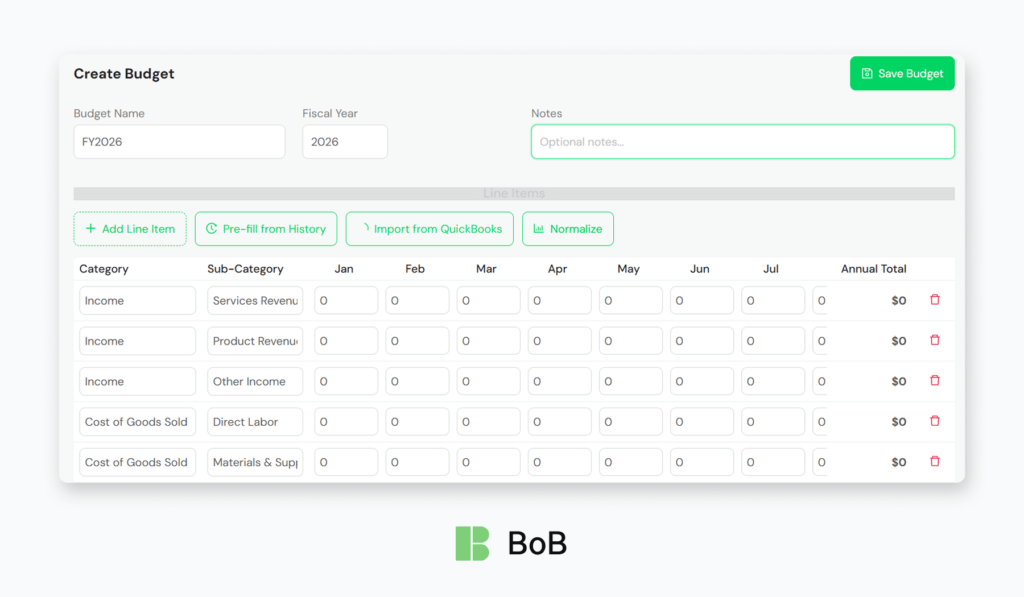
Step 1: Create the Budget Framework
We begin by creating a new budget in BoB:
- Define budget name (for example: FY2026 Operating Budget)
- Select fiscal year
- Add planning notes and assumptions
This creates the financial container for the entire plan.
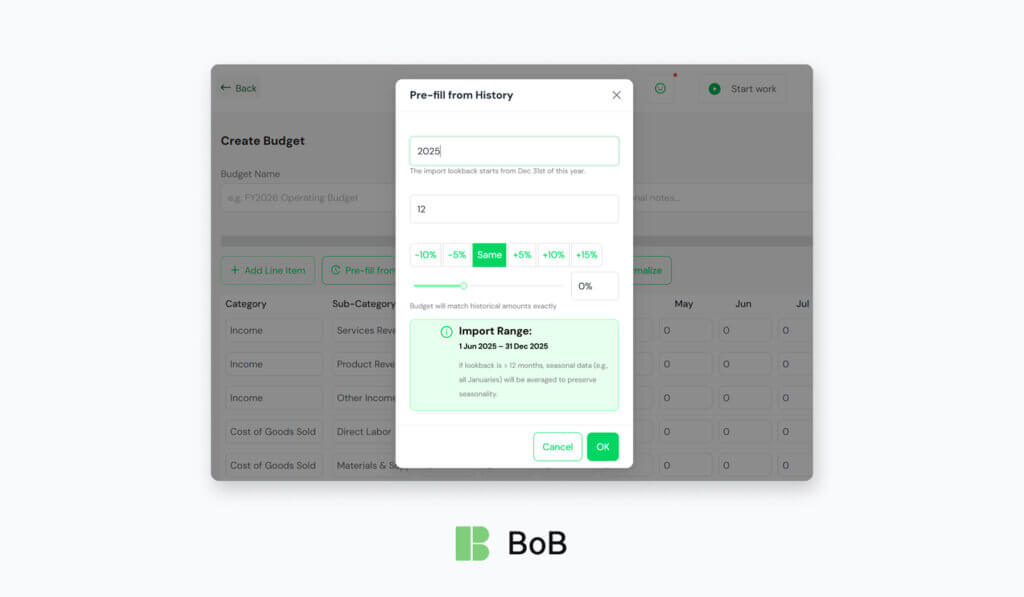
Step 2: Pre-fill the budget using historical data (BoB “Pre-fill from History”)
Instead of starting from zero, we use BoB’s Pre-fill from History function to pull a real baseline from prior records—so the first draft reflects how the business actually performed rather than assumptions.
What BoB pre-fills from history
- Income and expenses from prior periods
- Internal expenses, time entries, and recurring items (so labor-driven costs and repeating obligations are included, not just “accounting totals”)
How to set it up:
- Choose the lookback window (months).
The interface lets you define how many months to import (example shown: 12). For most annual budgets, 12 months is the cleanest baseline. - Pick a growth/adjustment factor.
BoB provides quick presets: -10%, -5%, Same, +5%, +10%, +15%.- Use Same when you want the budget to match historical amounts exactly (BoB explicitly states this).
- Use +5% / +10% when you expect controlled growth (e.g., higher rates, slightly higher utilization, steady pipeline).
- Use -5% / -10% for a conservative plan (e.g., client churn risk, hiring freeze, expected downtime).
- Fine-tune with the slider (custom %).
The slider shows an exact percentage (example: 0%) so you can set a precise adjustment instead of relying on presets. - Confirm the import range.
BoB displays the exact Import Range dates, so you can verify you’re not accidentally importing an incomplete or unusual period.
Practical tips we use
- Start with “Same” (0%) to get an honest baseline first—then iterate. It’s faster than guessing upfront.
- Create two quick scenarios by re-running the pre-fill:
- Baseline: Same (0%)
- Growth: +5% or +10%
- Conservative: -5%
- If your business is seasonal, keep the 12-month range so the monthly distribution stays realistic (not skewed by a strong/weak quarter).
Result
This produces a credible first version of the budget in minutes—built from actual revenue patterns, labor/time signals, and recurring costs—saving hours and improving planning accuracy immediately.
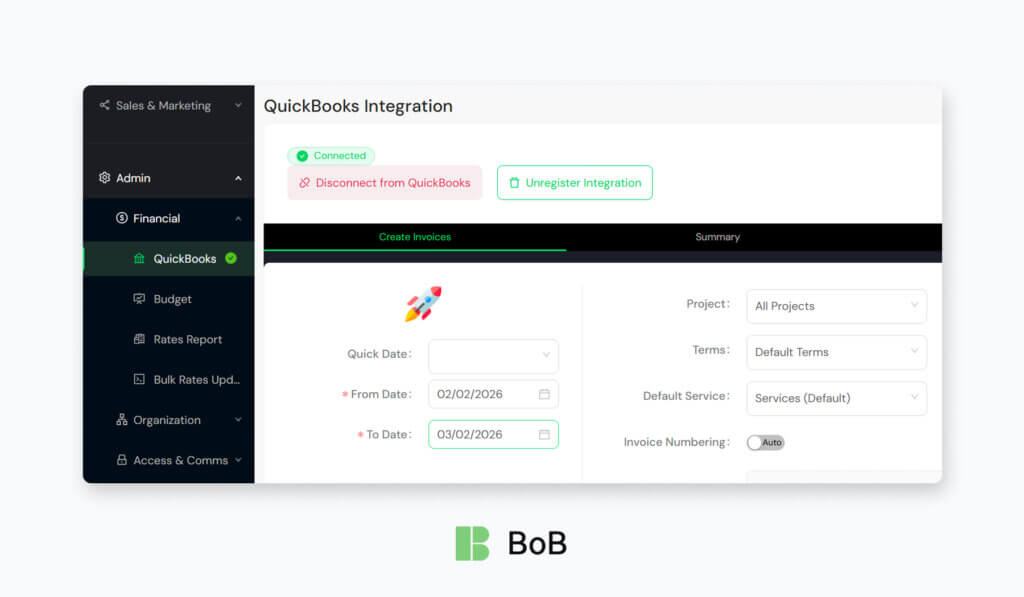
Step 3: Import Financial Structure From Accounting
We then import data from QuickBooks.
This ensures:
- Budget categories match accounting categories
- No disconnect between planning and actual financial reporting
This alignment is critical.
Step 4: Define Revenue Streams
Next, we structure income sources.
For example:
- Service revenue
- Product revenue
- Other income streams
Then distribute expected revenue month-by-month. This creates a realistic revenue timeline.
Step 5: Plan Payroll and Delivery Costs
Payroll is the highest cost in most service companies.
We use BoB to define:
- Salaries
- Contractors
- Subcontractors
- Direct labor costs
This helps us understand:
Step 6: Add Operating Expenses
We define expenses such as:
- Software subscriptions
- Marketing
- Legal and accounting
- Infrastructure
This creates the full operating model.
Step 7: Normalize and Adjust the Budget
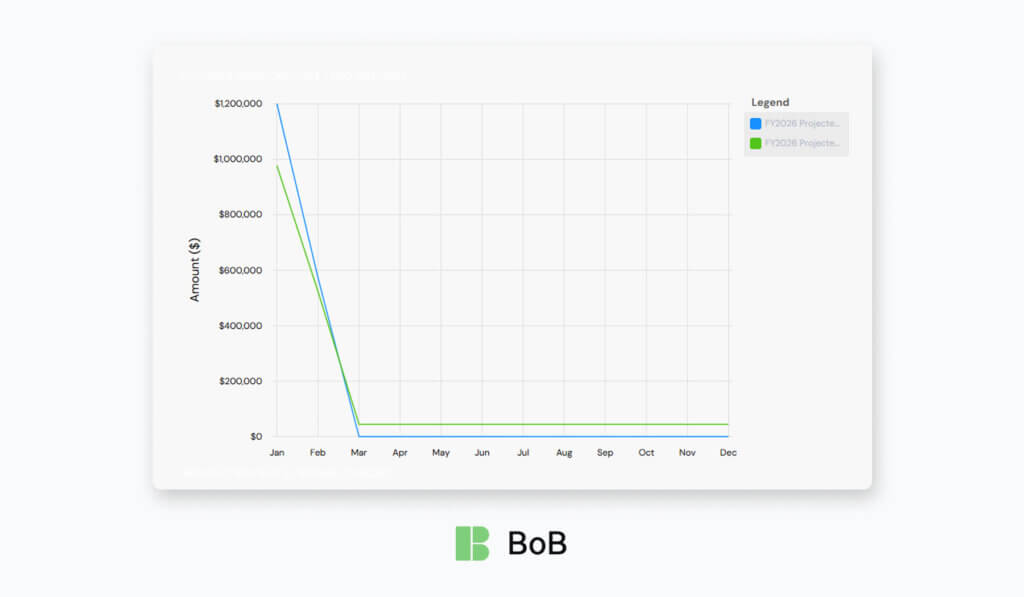
BoB’s normalization feature helps distribute values realistically across months.
We then adjust based on:
- Hiring plans
- Growth expectations
- Known changes
This converts the historical baseline into a forward-looking plan.
Step 8: Review Total Profitability
BoB automatically calculates:
- Monthly totals
- Annual totals
- Profit implications
This provides immediate visibility into:
Expected financial outcomes.
Step 9: Use the Budget as an Operational Control Tool
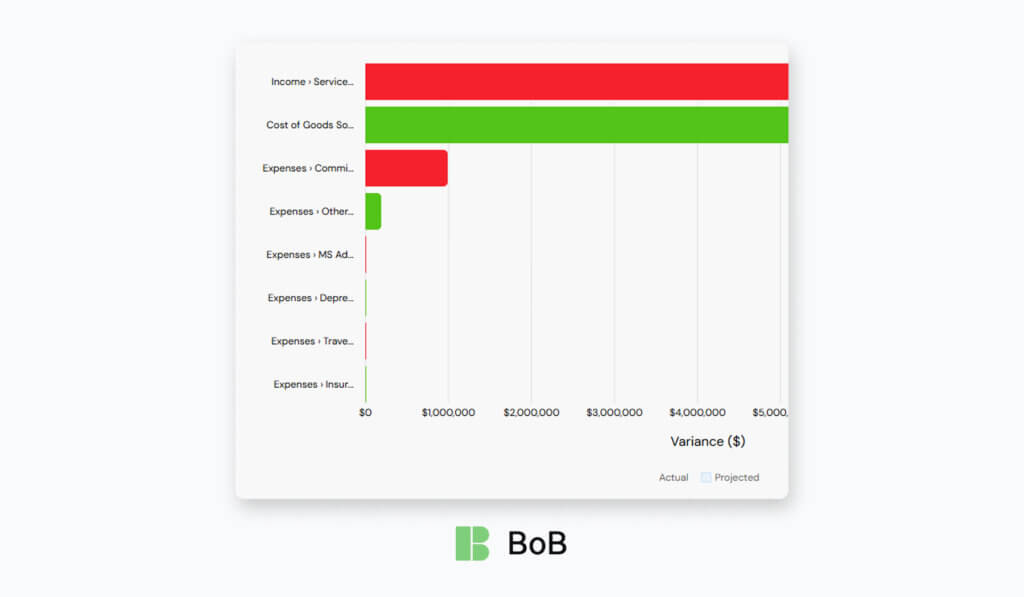
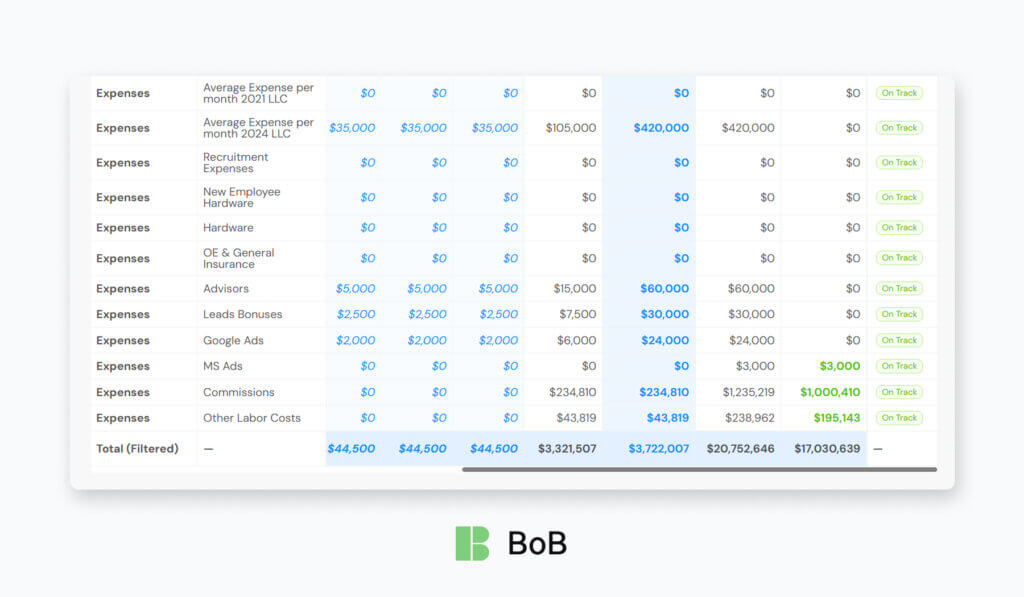
This is where budgeting becomes powerful. For small business budget planning, the budget should work like a living dashboard—not a document you open once a quarter. With small business budgeting software, you can continuously compare planned vs. actual performance, spot deviations early, and update assumptions as soon as reality changes. This is also how teams automate budget planning for small business operations: the budget stays current because it’s maintained through ongoing variance checks and quick adjustments.
How we run “planned vs. actual” in practice
| What we track | What we compare | What it tells us | Typical action |
|---|---|---|---|
| Revenue | Budgeted revenue vs. invoiced/recognized revenue | Whether pipeline assumptions are holding | Adjust forecast, tighten sales follow-ups, update start dates |
| Payroll & contractors | Planned staffing cost vs. actual payroll/contractor spend | Whether hiring pace and delivery costs match plan | Pause hiring, rebalance contractors, revise utilization targets |
| Operating expenses | Planned overhead vs. actual subscriptions, tools, marketing, cloud | Where spend is creeping up | Cut or renegotiate tools, cap discretionary spend |
| COGS / delivery costs | Planned project cost vs. actual hours/subcontractor costs | Early margin erosion | Re-scope, change order, reassign team, fix rework drivers |
| Profit (margin) | Planned margin vs. actual margin | Whether growth is profitable or just busy | Reprice work, shift project mix, improve delivery efficiency |
| Cash timing | Expected cash-in vs. actual receipts / payment delays | Runway risk | Tighten collections, adjust payment terms, delay non-critical spend |
The key principle: when results deviate, we don’t “wait for the end of the month.” We update the plan and treat the budget as a control loop—measure → compare → adjust—so it remains relevant and decision-ready.
Why This Approach Is Deeply Practical
This method works because it connects budgeting to real business operations. It is not a spreadsheet exercise. This small business budgeting planning method is a holistic management system, and it helps answer critical questions:
- Can we afford to hire?
- When will profitability increase?
- Where are financial risks?
This approach is actively used in our company to guide financial decisions.
Why Traditional Budgeting Often Fails
Many companies struggle because their budgeting process is disconnected from daily operations.
Common problems include:
Data is scattered, and small business budgeting becomes fragmented
In many teams, financial inputs are split across separate tools:
- CRM (pipeline and expected revenue)
- Accounting (actuals, invoices, expenses)
- Time tracking (delivery effort and cost drivers)
- HR systems (headcount, payroll, hiring plans)
When these sources don’t align, small business budgeting turns into manual reconciliation: exporting data, merging spreadsheets, and debating which number is “the real one.”
That’s why many companies look for small business budgeting software—not just to store a budget, but to connect planning to the underlying operational data so forecasts, costs, and profitability aren’t built on partial information.
Budgets go stale, and profitability issues surface too late
Business changes constantly—so a static annual budget loses relevance fast. When the budget isn’t connected to current delivery and cost signals, margin problems tend to appear only after month-end or quarter-end, when it’s already expensive to fix.
What changes throughout the year (and breaks a static budget):
- new hires, salary changes, contractor onboarding
- project scope shifts and timeline extensions
- pricing/rate adjustments, client pauses or churn
- higher-than-planned non-billable time (meetings, rework, support)
Why profitability becomes visible too late:
- Teams track “work done,” but not work cost vs. budget in real time
- Overruns and spend creep accumulate quietly until financial close
- Leadership sees the result (lower margin) after the damage is done
Brief examples:
- A fixed-price project overruns by 120 hours → margin collapses, discovered only at month-end.
- A subcontractor cost increases mid-project → budget still shows the old rate, so profit looks fine until invoices are reconciled.
- Utilization drops from 75% to 62% for two months → payroll stays constant, but revenue lags, and the runway shortens unnoticed.
Spreadsheets Break Easily
Manual planning creates:
- Errors
- Version conflicts
- Lack of trust in numbers
Eventually, leadership stops relying on the budget.
The Key Insight: Budget Must Be Operational
The importance of budgeting in small business: accounting looks back, budgeting looks ahead!
Accounting is a record of what already happened—it closes the month, reconciles transactions, and explains historical results. Small business budget planning is different: it’s a control system for what happens next. It turns goals into numbers, sets limits, and shows whether the company can hire, invest, or take on risk without putting cash flow and margins at risk. That’s the real importance of budgeting in a small business—it supports decisions before the money is spent.
A useful budget for budgeting small business operations has to be grounded in today’s reality:
- Current team and capacity: headcount, roles, utilization assumptions, contractor mix, planned hires, and start dates.
- Current cost structure: payroll burden, vendor stack, cloud spend, subcontractor rates, and overhead that scales with growth.
- Current revenue model: active contracts, pipeline quality, billing rates, payment terms, seasonality, and renewals.
When small business budget planning is built on last year’s assumptions—old rates, old utilization, outdated expenses, or a pipeline that no longer exists—it stops being a planning tool and becomes a historical artifact with a future date on it.
How BoB Solves This Problem
BoB transforms budgeting from a static spreadsheet into a connected operational system.
It integrates:
- Historical financial data based on your internal records, including expenses, time entries, and recurring items—this means the system can reuse actual labor hours, operational costs, and repeating financial obligations (such as salaries, subscriptions, retainers, or contractor payments) to build a realistic baseline instead of starting from empty assumptions.
- Revenue structure based on your custom categories and income streams, such as services, product sales, maintenance contracts, or other income types—allowing you to reflect how your business truly earns money, not a generic template.
- Cost structure aligned with your operational model, including payroll, subcontractors, tools, overhead, and delivery-related expenses—so planned margins reflect real delivery costs, not simplified estimates.
- Future projections built on real operational patterns, where past workload, recurring expenses, and financial trends help forecast upcoming months—making the budget a forward-looking planning instrument rather than a static spreadsheet.
This provides continuous visibility. Leadership can immediately see:
- Profit impact of hiring
- Revenue growth implications
- Financial risks
This allows faster, safer decisions.
Budget Planning Becomes a Strategic Advantage
| What changes | What it looks like in practice | Practical outcome |
|---|---|---|
| Clarity replaces ambiguity | Revenue, payroll, and operating costs are modeled together (not in separate files). | Leaders understand what’s driving margin and where the budget is most sensitive. |
| Guesswork becomes forecast discipline | Assumptions are explicit (rates, utilization, churn, hiring dates) and reviewed monthly. | Forecast accuracy improves and “surprises” become explainable deviations. |
| Reactive decisions shift to proactive control | Hiring, vendor spend, and project pricing are evaluated against profit and runway before approvals. | Fewer rushed cost cuts; smarter growth decisions with less risk. |
| Safer growth planning | Teams plan capacity and cash timing, not just annual totals (month-by-month view). | Reduced over-hiring/under-hiring; steadier delivery and healthier utilization. |
| Financial surprises turn into early signals | Variance tracking flags overspend, revenue dips, or margin erosion early. | Issues are corrected in-week or in-month—not after quarter-end. |
| Accountability becomes operational | Budget owners are defined per category (payroll, tools, marketing), with clear thresholds. | Spending is controlled without slowing execution; fewer hidden cost leaks. |
Final Thoughts
Budget planning is not just a financial task. It is a core operational discipline. Companies that build structured budgets:
- Grow more predictably
- Protect margins
- Make better strategic decisions
In our experience, using BoB to plan and manage our budget has made the process practical, structured, and reliable. It connects financial planning with real business activity—exactly where budgeting belongs.
If you want to replace spreadsheets with structured operational budgeting, explore how BoB helps companies plan, manage, and control their financial future with confidence.







![Byoxon vs Kantata: Enterprise PSA vs Modern Service Ops [Kantata Alternative Review]](https://byoxon.com/wp-content/uploads/2026/02/BoB-2-4-768x448.png)